 Business
Everything You Need to Know About Microsoft Viva Sales
Data entry can be a real drag for salespeople. The time they spend on administrative tasks is time away from customer interactions. But that data is vital.
It’s important to capture customer orders, quotes, needs, and more. Lead and sales reporting help sales managers know where to direct their attention. Analytics also help drive more efficient ways of closing the deal.
Microsoft has taken up the mantle of this challenge. It is about to launch a new digital experience for sales teams. Microsoft Viva Sales is part of the “Viva” line of applications. These include things like Viva Insights for improved staff wellbeing. As well as Viva Learning for staff development.
The Viva apps natively integrate with MS Teams and the Microsoft 365 ecosystem. They include automation designed to eliminate boring tasks and enable more work engagement.
Viva Sales is a “CRM helper” application. We’ll go through some of the most asked questions about the app, its features, and when you can get it.
What Is Microsoft Viva Sales?
Viva Sales is an application that will provide sales and lead insights. These insights populate throughout Office 365 and Microsoft Teams. The focus of the app is to cut unnecessary manual entry to give sellers more time to sell.
How Does Viva Sales Work? Is It a CRM?
Viva Sales is NOT going to replace your normal CRM platform. Instead, it connects to your CRM and other sales-related apps. It leverages the data from these connections. This makes it easier for salespeople to get the prospect data they need to enable their work.
Salespeople spend approximately 34% of their time on administrative tasks.
Viva Sales Basics
Some of the core advantages of Viva Sales are:
- Eliminate Forms: Data entry for sales professionals is greatly reduced. This frees them up for more customer relationship building.
- Powerful Data Leveraging: Viva Sales connects to several platforms. This includes non-Microsoft programs and CRMs. The integration allows salespeople to cross-reference data points and gain valuable insights.
- AI-Driven Help: Salespeople will get prompts that are AI-driven. These suggestions and reminders help them along in the sales process with a lead.
Interconnected Interface
Microsoft Viva Sales provides sales-specific insights throughout the various M365 applications. Salespeople natively see important customer details, wherever they are. Including in their Outlook Calendar or when in their Microsoft or non-Microsoft CRM.
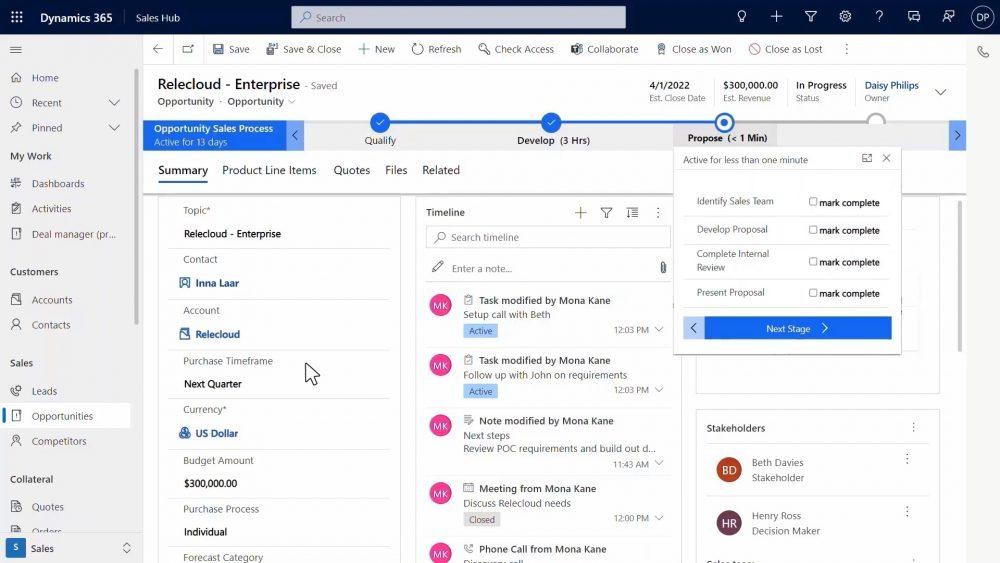
Viva Sales Features
Tag to Capture Sales Interactions
Tagging is also known as using someone’s “@name” to get their attention. Tagging is a popular software integration used throughout many cloud-based apps. It’s also used within Microsoft 365.
Salespeople can use the familiar tagging function. They can use it to capture data from another M365 application for a prospect or customer. This includes adding someone to a list of customers by using a tag for their Viva Sales name. The system will capture the contextual information on the lead or customer.
Collaborate
Viva Sales makes it easier than ever to collaborate with your team on a sales prospect or customer. You don’t have to chase down information to copy/paste into a message. Use that tagging function to populate lead information from Viva Sales in seconds.
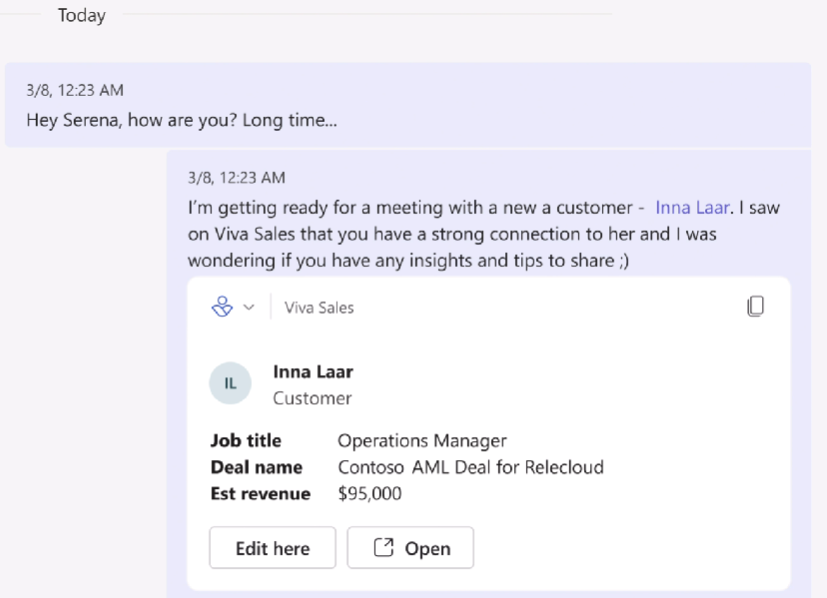
You can also easily edit or open a lead/customer record. No need to look for and open another app. The process gets you where you need to go in as few clicks as possible.
Call Summaries & Integrated Data
One thing that customers and salespeople hate is a lack of understanding. For example, when a salesperson doesn’t know about a recent customer interaction.
This can happen when company communication systems store data from different sources separately. Such as phone call messages being in one place and a customer’s website chat session being in another.
Viva Sales brings all that customer engagement data together into a single view. This allows the salesperson to see call summaries and capture call action items.
Download & Customize
Salespeople that prefer an Excel view of their contact list can get this from Viva Sales. Download lead and customer lists. Customize the application per the organization’s needs.
When Will Viva Sales Be Available?
Microsoft has announced that Viva Sales will be “coming in Q4 2022.” There is no exact date for the launch yet, but you can be sure that we will keep an eye on this!
In the meantime, you can watch a video explaining the application on Microsoft’s site here.
Take Advantage of Microsoft Viva Automation
Microsoft built the Viva suite of digital experience apps for productivity. These apps help employees find information faster, feel more connected, and work more productively.
Now is the perfect time to explore those that have already launched and get ready for Viva Sales.
Contact us today for a free consultation to improve your team’s digital experience.
This Article has been Republished with Permission from .