 Microsoft
Workspaces, a VPN & More – Learn the Newest…
Microsoft Edge continues to redefine user experiences. This is due to Microsoft’s commitment to innovation. The latest updates bring a host of features. These are designed to enhance productivity, security, and browsing satisfaction.
Chrome may have been number one for years. But Edge has been steadily gaining popularity. It is now the third most popular browser worldwide. Overtaking Firefox a while back, it’s now just behind Chrome (1) and Safari (2).
From personalized workspaces to a built-in VPN, Microsoft Edge is not just a browser. It’s a comprehensive toolkit for users navigating the digital landscape. Let’s delve into the newest Microsoft Edge features. They promise to elevate your online journey.
A New Era of Productivity: Microsoft Edge Workspaces
Introduction to Workspaces
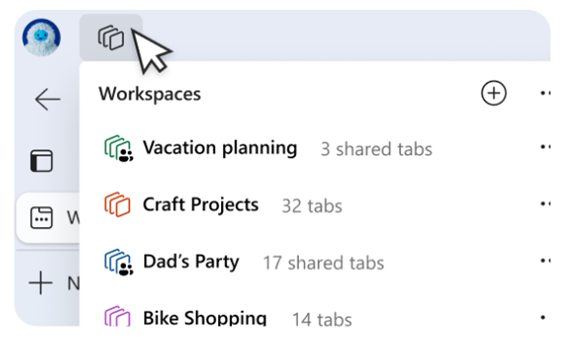
Workspaces in Microsoft Edge represent a paradigm shift. A shift in how users organize and manage their online tasks. Imagine having a dedicated space for each project. One that seamlessly integrates relevant tabs, documents, and websites.
Microsoft Edge Workspaces makes this a reality. It allows users to create custom workspaces. Each workspace represents different aspects of their digital lives. Whether you’re working on a project, planning a trip, or pursuing a hobby. Workspaces offer a tailored and organized browsing environment.
Key Features of Microsoft Edge Workspaces
- Personalization: Users can customize Workspaces with a unique name and color. This makes it easier to distinguish between different projects or activities.
- Easy Access: With a single click, users can switch between Workspaces. This instantly transitions them between different sets of tabs and online resources. Users associate each Workspace with specific projects or interests.
- Persistence: Workspaces keep their configurations. This is the case even when users close and reopen the browser. This ensures that users can seamlessly resume their work. There is no need to reconstruct their customized environments each time.
- Efficient Task Management: Workspaces make task-focused browsing easier, minimizing distractions. This helps users maintain focus on the specific project or activity at hand.
Enhanced Security with Edge Secure Network VPN
Built-in VPN
Microsoft Edge takes a giant leap in prioritizing user privacy and security. The Edge Secure Network uses a new built-in VPN. VPNs, or Virtual Private Networks, encrypt internet connections. This helps ensure a secure and private browsing experience. Microsoft Edge now provides users with 5GB of free VPN data per month. This further protects their online presence.
Key Benefits of the VPN in Microsoft Edge
- Enhanced Privacy: VPNs mask users’ IP addresses. This makes it challenging for malicious actors to track their online activities. This is particularly crucial when accessing public Wi-Fi networks. As well as sensitive information.
- Secure Browsing: The VPN has an encrypted connection. This ensures that data transmitted between the user’s device and internet is secure. It reduces the risk of interception by hackers.
- Geographic Consistency: Edge’s VPN will mask your specific location. Websites will see a location similar to yours. So, when you look up movie times or nearby services, you see what you expect. You cannot choose a specific region to route traffic from.
- Complimentary 5GB Data: Microsoft Edge users receive 5GB of free VPN data each month. To conserve the data limit, content streaming sites aren’t routed through the VPN. These are sites like Netflix, Hulu, Disney+, etc.
Other New Features Added to Microsoft Edge Browser
Microsoft is continuously updating Edge. Here are a few more new features you can enjoy.
- Autofill for Forms: Edge makes filling out forms online easier. It will suggest completions when you start typing into fields. This includes name, email, address, etc.
- Web Capture: Using Web Capture in Edge makes it easy to take a screenshot. You can select an area or a full page. Then paste it into any of your files.
- Copilot: Use the Copilot icon at the top of Edge to access AI features. This includes creating AI-generated images as well as creating quick email drafts and more.
- Read Aloud: Need to step away from the screen for a moment? Let Edge read content for you out loud. Enabling you to multi-task like there’s no tomorrow!
Get Help Exploring Your Microsoft Services
Microsoft Edge establishes itself as a comprehensive solution. It’s great for those seeking a more productivity-focused browser. As well as a secure and private online environment. Microsoft Edge’s latest features enhance the way we work, explore, and connect.
Is your company in need of help exploring what Microsoft has to offer? From Edge enhancements to Microsoft 365 tools, we have experts to guide you.
Don’t miss out on all that these solutions have to offer. Our Microsoft experts can help set up, manage, and secure your digital workflows.
Give us a call today to schedule a chat.
This Article has been Republished with Permission from The Technology Press.