 New Technology
What Should You Expect in the New iOS 17?
Apple’s iOS updates have always been eagerly anticipated. iPhone and iPad users around the world get excited to see what their devices can do next. The newest major upcoming release will be for iOS 17. This fall, Apple is set to introduce a host of exciting new features and improvements.
iOS 17 promises to deliver an even more intuitive and seamless user experience. There will also be big changes for Messages and sharing across phones.
In this article, we’ll take a closer look at some of the key features you can expect. Get ready to explore the latest innovations that Apple has in store for its users.
Get an Instant Transcript of Voicemails
How do you know if that voicemail that came in while in a Zoom meeting is important? iOS 17 is going to make that much easier to determine. When you get a voicemail, you’ll see a transcript of the message on your screen. No more guesswork!
Personalized Contact Posters
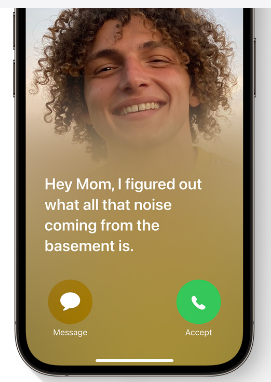
Do you hate the picture that someone has saved of you in your contact? The one that comes up every time you call them? You’ll now have power over how you look when you call others.
Apple is introducing personalized Contact Posters. You can customize how you’ll look when calling people with whom you’ve shared your poster. You can appear as your photo, a Memoji, and more. You can also add text and colors.
Leave a Video or Audio FaceTime Message
You have better options when calling someone on FaceTime and they’re not there. Instead of just leaving a missed call. FaceTime will support audio and video messages. These are like enhanced voicemails.
Now, if you want to share an exciting visual in the moment, you can. Even if the person doesn’t pick up. You can leave it for them to watch later.
More FaceTime Enhancements – Reactions & Apple TV
Another cool enhancement coming to FaceTime are more expressive reactions. Some of the new ways to express yourself include:
- Hearts
- Balloons
- Fireworks
- Laser beams
- Rain
- and more
Also, a FaceTime call can now connect with AppleTV. See loved ones right from your large-screen television, as big as ever.
Stickers, Anyone?
If you’re a fan of stickers in messages, you’re going to love this next feature. Messages will be getting a big sticker enhancement in iOS 17. This includes new emoji stickers. You’ll also have the ability to create Live Stickers from subjects in photos.
You can also liven stickers up with effects. A sticker drawer is also going to be available to store them all neatly.
AirDrop & NameDrop for Easier Sharing
Sharing photos, videos, and files across devices will get better. In just seconds, you can use AirDrop to share files from one phone to another.
NameDrop gives you a quick way to share contact details. All you need to do is bring two iPhones together. It also works with an iPhone and Apple Watch. Oh, and music is included in the sharing fun!
NameDrop is also how you’ll share that cool Contact Poster you made.
Smarter Autocorrect & Dictation
Who hasn’t cursed an autocorrect choice that makes you look bad? Apple feels your pain and is introducing smarter autocorrection. This feature will get a machine learning language model upgrade. The update will help it predict text better to learn what you really meant to type.
Dictation is also getting an upgrade. It will use a new speech recognition model to improve its accuracy.
StandBy Glanceable Screen Mode
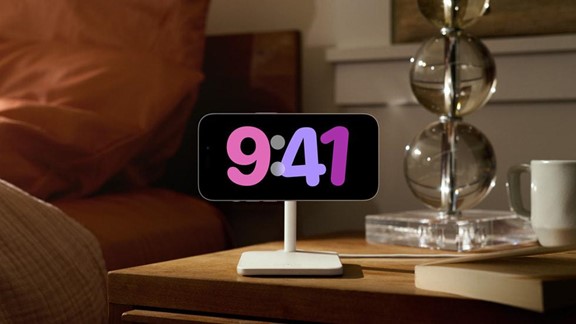
Apple wants your iPhone to be even more useful. Even when it’s charging across the room. So, iOS 17 introduces StandBy. This gives users a full-screen experience with information shown big on the screen.
You can personalize the display with a full range of helpful views:
- Clock styles
- Favorite photos
- Widgets (including Smart Stacks)
- Live Activities
- Siri
- Incoming Calls
New Mental Health Features in the Health App
Apple is introducing more mental health features. The health app will enable users to log daily moods and momentary emotions. The goal is to help people see what contributes to their state of mind. As well as easily access depression and anxiety assessments used in clinics.
Screen Distance in Screen Time will also assist with digital eyestrain. It will encourage a user to move their device farther away from their face. It will do this if users have held their phone closer than 12 inches over a certain period of time.
Get Help with Smartphone Tutoring, Security & More
iOS 17 is shaping up to be an exciting update for Apple users. It offers a range of new features and enhancements. Even more than we could fit into this article.
If you’re looking for help learning how to use your phone’s features or enhancing security, give us a call. We can improve your experience with one of the most important pieces of tech people use today. Their smartphone.
Give us a call, and let’s chat.
This Article has been Republished with Permission from The Technology Press.